
Ship Your ML Model From Local To Production


You’ve trained a model. Accuracy looks good. You save it. And then… nothing.
The notebook sits there. Nobody else can use it. The model never leaves your laptop.
Under 50 lines of Python. A trained scikit-learn model, a FastAPI server, a Dockerfile, a Python client, and a requirements file. That’s the whole thing.
What’s inside the box
Clone it and you get a directory that looks like this:
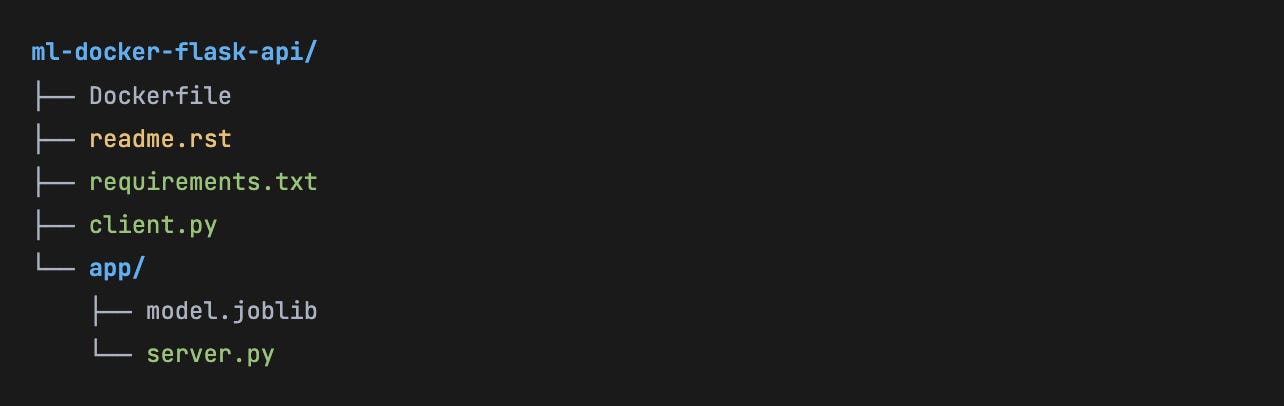
The model is a pre-trained classifier on the classic Iris dataset, saved with joblib. The server is a FastAPI app that loads the model at startup and exposes a single POST /predict endpoint. The Dockerfile packages it all into a portable, reproducible container. Let’s go layer by layer.
The system at a glance
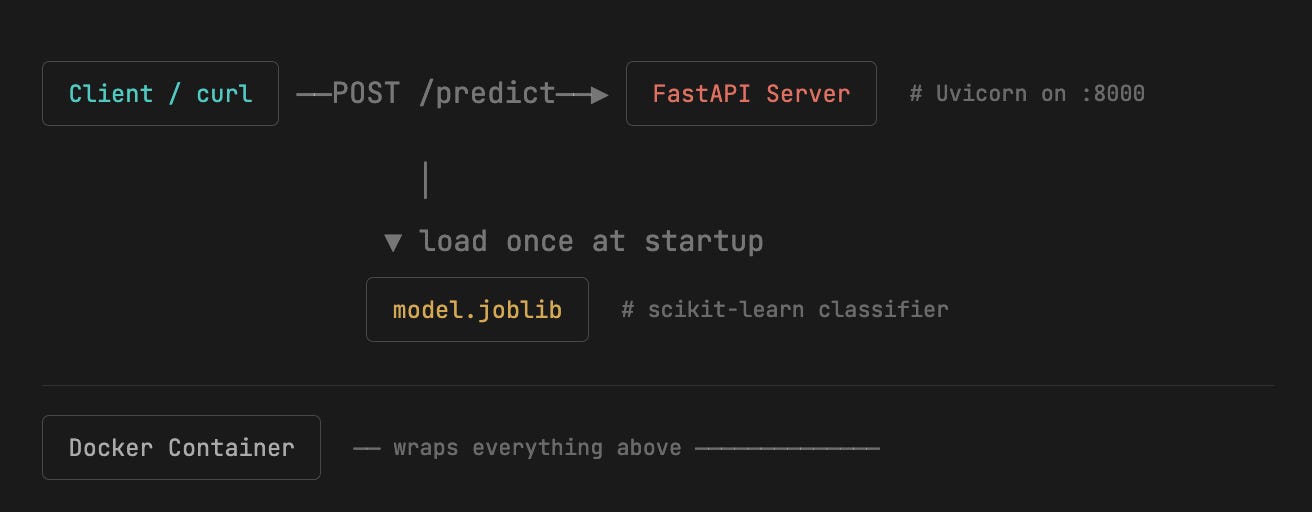
server.py - deceptively simple
Here is the entire server, annotated:
from fastapi import FastAPI
import joblib
import numpy as np

# Model loaded ONCE at import time — no per-request overhead
model = joblib.load(’app/model.joblib’)

# Map integer predictions back to human-readable labels
class_names = np.array([’setosa’, ‘versicolor’, ‘virginica’])

app = FastAPI()

@app.get(’/’)
def read_root():
    return {’message’: ‘Iris model API’}

@app.post(’/predict’)
def predict(data: dict):
    “”“
    Accepts: {”features”: [5.1, 3.5, 1.4, 0.2]}
    Returns: {”predicted_class”: “setosa”}
    “”“
    features = np.array(data[’features’]).reshape(1, -1)
    prediction = model.predict(features)
    class_name = class_names[prediction][0]
    return {’predicted_class’: class_name}
Three patterns worth noting here:
1. Global model loading
The joblib.load() call happens at module import time — not inside the endpoint function. This means deserialization cost is paid once when the container starts, not on every request. For larger models, this is critical.
2. Untyped dict body
The request body is typed as a plain dict. It works, but a Pydantic model would give you automatic validation and a nicer OpenAPI schema — a natural next step when adapting this template.
3. Auto-generated docs
Because FastAPI is used, you get a Swagger UI at /docs for free. Zero extra code needed — just open the browser and test your endpoint interactively.
Dockerfile - what each line actually does
# Start from official Python 3.11 base — slim might be better for prod
FROM python:3.11

# All commands run from /code inside the container
WORKDIR /code

# Copy deps first — Docker caches this layer if requirements.txt unchanged
COPY ./requirements.txt /code/requirements.txt
RUN pip install --no-cache-dir -r /code/requirements.txt

# Copy the app directory (model + server)
COPY ./app /code/app

# Document the port (doesn’t actually publish it — that’s -p at runtime)
EXPOSE 8000

# Start Uvicorn serving the FastAPI app on all interfaces
CMD [”uvicorn”, “app.server:app”, “--host”, “0.0.0.0”, “--port”, “8000”]
Three commands from zero to inference
1. Build the image
Docker reads the Dockerfile, pulls the Python base, installs deps, and bakes the model in.
docker build -t iris-api2. Run the container
Map your host port 8000 to the container’s 8000. Uvicorn starts automatically.
docker run --name iris-container -p 8000:8000 iris-api3. Hit the endpoint
Send four Iris features (sepal length, sepal width, petal length, petal width). Get a class back.
curl -X POST “http://0.0.0.0:8000/predict” \
  -H “Content-Type: application/json” \
  -d ‘{”features”: [5.1, 3.5, 1.4, 0.2]}’

# Response:
{”predicted_class”: “setosa”}
The Python client - because curl gets old fast
The repo includes client.py - a script that loops over a batch of 12 flower measurements and collects predictions:
import json, requests

data = [[4.3, 3.0, 1.1, 0.1], [5.8, 4.0, 1.2, 0.2], ...]
url  = ‘http://0.0.0.0:8000/predict/’

predictions = []
for record in data:
    resp = requests.post(url, data=json.dumps({’features’: record}))
    predictions.append(resp.json()[’predicted_class’])

print(predictions)
# [’setosa’, ‘setosa’, ‘setosa’, ...]
Why this template matters
The ML community has a deployment gap problem. Models get trained, celebrated, and shelved. This repo offers a concrete, working pattern that you can clone, swap in your own model.joblib, and have a running API in minutes.
The technology choices (FastAPI over Flask, Uvicorn, joblib, Docker) are all industry-standard. The file count is ruthlessly small. There’s nothing to get lost in.
If you’re an ML practitioner who has never deployed a model, this is your entry point. If you’re an experienced engineer, it’s a clean boilerplate to modify rather than build from scratch.
Access the whole GitHub repo here:
https://github.com/DanilZherebtsov/ml-docker-flask-api.git
